
Mervious: AI Photo & Video Art
CrocoTechPhotography
4.621.00 Reviews
- Version
- 1.3.6
- Installs
- 1.00M
- Age Rating
- Everyone
Screenshots
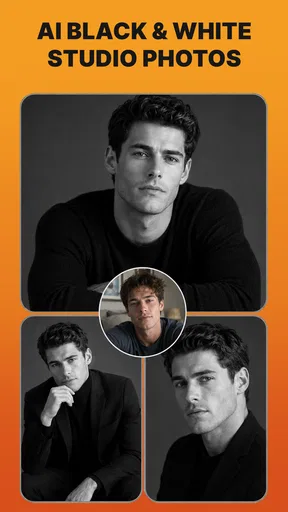

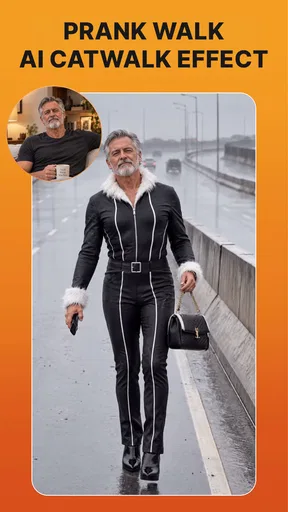
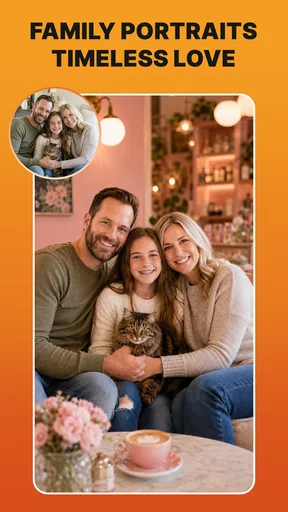


Our Review of Mervious: AI Photo & Video Art
 Analysis by Appyee
Mervious: AI Photo & Video Art is the kind of photography app that immediately invites experimentation. I opened it expecting a quick way to turn ordinary images into more stylized creations, and its focus on AI-generated photos, videos, portraits, and templates makes that first session easy to understand: choose a visual direction, provide an image or idea, and see what the app can produce. It is free to install, suitable for Everyone, and developed by CrocoTech, so the barrier to trying it is low.
The more interesting question is what happens after the first burst of curiosity. Many AI art apps are entertaining for an afternoon and then become clutter on a phone. My experience with Mervious is more balanced. It has genuine value for people who regularly make social posts, profile images, visual greetings, or playful edits, but it is less convincing as a replacement for a full photo editor. Its strength is fast creative variation, not careful manual control.
What using Mervious feels like in the first week
The first week is where this app makes its best impression. The combination of portraits and templates gives me a simple starting point when I do not have a clear concept of my own. Instead of opening a blank canvas and wondering what to do, I can approach the app with a practical goal: create a different profile picture, prepare a themed post, or give a familiar portrait a more imaginative treatment.
That guided approach matters because AI image tools can otherwise feel unpredictable. A template provides a visual destination, while the portrait angle makes the app feel personal rather than purely decorative. I found that the most satisfying results came from starting with a reasonably clear, well-lit photo and treating the generated image as a creative interpretation rather than a faithful replacement for the original.
The best early use is fast visual exploration, not precision retouching. If I want to remove a tiny distraction, correct a specific color, or adjust a face with exact control, a conventional editor remains more dependable. Mervious is better when the goal is to ask, “What would this picture look like in a completely different style?”
The video side adds another reason to return during the first few days. A still image can feel finished quickly, while a generated or stylized video gives the result more presence in a feed or message. I would use it for a short visual greeting, a playful post, or a small personal project where movement makes the image feel less ordinary. I would not approach it expecting the timeline tools, detailed transitions, or audio workflow of a dedicated video editor.
One useful habit is to prepare several source images before starting. Rather than repeatedly forcing one photograph through every available treatment, I get better variety by testing a close portrait, a wider casual shot, and an image with a clearer background. This also makes it easier to judge whether a result is genuinely good or merely interesting because it is new.
Mervious is currently at version 1.0.0, and that detail shapes my expectations. The app feels like something to explore with an open mind rather than a mature creative suite with every workflow polished. I would give myself time to learn which kinds of source images work best instead of judging it from one unsuccessful generation.
Who gets the most from the novelty
This app is a strong fit for casual creators who want fresh ideas without learning complicated software. Someone preparing a birthday message, refreshing a social profile, or making a themed image for a group chat can get more value from ready-made creative directions than from a large set of manual sliders.
It also suits people who enjoy comparing variations. The appeal is not always one perfect output. Sometimes the fun is seeing how the same subject changes when the visual treatment changes. That makes Mervious particularly approachable for users who like experimenting but do not consider themselves photographers or designers.
There is a practical advantage for small personal projects too. If I need a visual concept before committing to a larger design, an AI-generated portrait or template-based image can help me decide on a mood. I can use the result as inspiration, even when I ultimately finish the project elsewhere.
On the other hand, I would skip it if my main requirement is professional consistency. A client identity, product catalog, formal headshot, or carefully controlled campaign needs repeatable composition and predictable edits. AI styling can introduce changes that are attractive in one image but distracting across a set. For those jobs, Lightroom-style adjustments, a layer-based editor, or a dedicated video application is the better choice.
Whether it earns a place beyond the first month
The first month is a different test from the first week. Novelty fades, and the question becomes whether Mervious solves a recurring problem. I think it can, but only when it becomes part of a specific routine. Opening it randomly every day is unlikely to remain rewarding. Opening it whenever I need a new visual idea, a portrait variation, or a quick template-based post is more sustainable.
For example, imagine I am preparing a small set of posts for a personal event. I could use ordinary photos for the factual updates and turn to Mervious for the announcement image, invitation-style visual, or final recap. In that workflow, the app has a clear role: it supplies imaginative assets around the edges of a project without pretending to manage the entire project.
Another realistic scenario is a family group chat. A relative sends a portrait, and I want to make a lighthearted birthday image without spending an hour designing it. Mervious can be useful because the creative distance between the original photo and the finished result creates the surprise. The important restraint is to keep the result appropriate to the person and occasion; an unusual AI treatment is not automatically a better one.
Its recurring value also depends on how often the available templates feel relevant to me. Templates are helpful when they reduce decision-making, but they can become repetitive if my interests are narrow. I would judge the app month by month based on whether I am still finding new directions for my own photos, not simply whether the app can produce another output.
The public response suggests that many users have found the concept appealing: Mervious holds a 4.9 average from 777 ratings and has passed 100K+ installs. Those figures make it easier for me to take the app seriously as an active photography tool, but they do not remove the need to test it against my own habits. A high average can reflect strong first impressions, while long-term usefulness depends on whether the results keep fitting real tasks.
How I would build a repeatable workflow
I would begin by keeping a small, organized selection of source images rather than uploading whatever happens to be newest. A few portraits with different expressions, backgrounds, and lighting conditions give the generator more useful material. This is a simple but non-obvious improvement: the quality of the starting image affects my judgment of the app more than endlessly switching templates.
Next, I would separate experiments from finished images. I would not save every variation. Keeping only the strongest results prevents the phone gallery from filling with near-duplicates and makes the app feel more productive. For a recurring social workflow, I would also choose a limited visual direction for a particular project so the final images feel related.
A third useful approach is to use Mervious at the concept stage. If I am unsure whether a portrait should feel playful, dramatic, or polished, generating a few directions can help me choose. This is more valuable than asking the app to complete every step. It lets Mervious contribute imagination while I retain responsibility for the final selection and message.
These habits reveal a trade-off. The app reduces the effort needed to create an unusual image, but it shifts effort toward selection. I may spend less time editing and more time deciding which result actually represents the person or occasion. Users who enjoy curation will probably accept that exchange; users who want one-click perfection may find it tiring.
Maintenance, friction, and the reasons fatigue can appear
Mervious is easy to try because the app itself is free, but the presence of in-app purchases priced from $19.99 to $39.49 per item changes how I would use it over time. I would not treat every interesting result as a reason to pay. Before committing to a purchase, I would first establish whether the app has become part of a real workflow and whether the paid option solves a repeated need rather than satisfying a moment of curiosity.
This is especially important with AI creativity apps because the emotional response can be immediate. A surprising portrait may feel worth paying for in the moment, yet the same effect can lose its appeal after several sessions. My advice is to test the free experience with several different projects and source photos first. If the app still saves me time or gives me ideas after that test, the purchase becomes easier to evaluate rationally.
Maintenance also means managing expectations. AI output can be visually impressive while still missing the exact identity, mood, or detail I wanted. I would inspect faces, hands, clothing, text, and background elements before sharing anything publicly. A result that looks convincing at a glance may contain small distortions that become obvious when viewed more closely.
That checking step is one of the app’s hidden costs. Mervious may shorten the creation process, but it does not eliminate the need for an editor’s eye. In fact, the faster production becomes, the more important selection and review are. I would never assume that a generated video or portrait is ready simply because the overall composition looks attractive.
Another source of fatigue is decision overload. A large collection of possible treatments can turn a five-minute task into a long chain of comparisons. To avoid that, I would decide on the purpose before opening the app: a friendly portrait, a humorous image, a visual announcement, or a mood reference. Limiting myself to a few suitable directions keeps the creative process from becoming endless browsing.
The app is also not the right maintenance-free solution for a serious archive. I would keep original photos separately and treat generated versions as additional creative files. That protects the source material and makes it possible to try a different approach later. It is a small organizational step, but it prevents an AI edit from becoming the only copy of an important image.
Where ordinary alternatives still win
A standard phone editor is better for speed when the task is cropping, straightening, adjusting exposure, or applying a familiar filter. It is also more predictable. I know what will happen when I move a slider, whereas an AI transformation may alter several visual elements at once.
A professional photo editor wins when I need layers, masks, selective corrections, or consistent treatment across many images. A dedicated video editor is the stronger choice when timing, sound, captions, transitions, and precise clips matter. Mervious should sit before or beside those tools, not replace them.
Its advantage over those alternatives is the creative leap. Conventional editors help me improve what is already there; Mervious helps me imagine a different version of it. That distinction makes the app worthwhile for ideation and personal expression, even when another application handles the final polish.
Privacy-conscious users should also make their own comfort decision before using personal portraits with any AI image service. I would begin with non-sensitive images and avoid treating the app as a place for confidential or irreplaceable material. That is not a criticism unique to Mervious; it is a sensible boundary whenever photographs are processed by an AI-focused tool.
My long-term verdict on Mervious
After the novelty settles, I see Mervious as a useful creative companion rather than an essential all-purpose camera editor. Its strongest lasting role is helping me overcome a blank page. When I need a portrait with a different feel, a quick visual concept, or a template-led image for a personal occasion, it can make the first step much easier.
I would recommend it to casual photographers, social creators, families making playful images, and anyone who likes visual experimentation without mastering complex editing software. The Everyone age rating also makes its general audience broad, although I would still use personal judgment when sharing AI-generated images of other people.
I would not recommend building a professional production workflow around it alone. The combination of generated variation, possible review time, and paid items means the app works best when I define its boundaries. Use it for ideas, portraits, and expressive posts; use a conventional editor when accuracy, repeatability, or detailed correction matters more than surprise.
For me, the deciding factor is habit. If I can name a recurring situation where Mervious saves time or adds imagination, it deserves space on my phone. If I only open it to repeat the same novelty effect, fatigue will arrive quickly. Its lasting value comes from having a clear creative job, not from generating endless variations.
Mervious: AI Photo & Video Art is worth trying because it makes experimentation approachable and gives ordinary photos a fresh starting point. I would install the free app, test it with several kinds of images, keep my originals safe, and judge it by the quality of the ideas it contributes over several weeks. That approach lets the app prove whether it belongs in my regular photography routine instead of allowing the first impressive result to make the decision for me.
Privacy and Permissions
See what permissions an app requests and how it handles your data.
- Wi-Fi connection information
- view Wi-Fi connections
- Other
- view network connections, full network access, control vibration, prevent device from sleeping, set an alarm, Google Play license check
Verdict
Strengths of Mervious: AI Photo & Video Art
- Creates artistic photos and videos from simple text prompts.
- Offers multiple visual styles for experimenting with creative ideas.
- Easy interface suitable for beginners with little editing experience.
- Can transform existing images into stylized AI artwork quickly.
- Useful for social media posts, profile pictures, and digital projects.
Limitations of Mervious: AI Photo & Video Art
- Results may vary significantly depending on the prompt used.
- Some advanced effects or exports may require a paid subscription.
- AI processing can take longer when servers are busy.
- Video generation may be limited by duration, resolution, or credits.
- Uploaded photos may raise privacy concerns for cautious users.
Similar Picks in This Category
View All
Google Photos
Google LLC4.4

Gallery
Google LLC4.2

Picsart AI Photo Editor, Video
PicsArt, Inc.3.9

B612 AI Photo&Video Editor
SNOW Corporation4.1

BeautyPlus-Selfie Photo Editor
PIXOCIAL TECHNOLOGY (SINGAPORE) PTE. LTD.4.5

Remini - AI Photo Enhancer
Bending Spoons4.1
Frequently Asked Questions
What is Mervious: AI Photo & Video Art, and what can I create with it?
Mervious: AI Photo & Video Art is an AI-powered creative app designed to transform ordinary photos and videos into stylized visual content. Depending on the available tools and templates, you can apply artistic effects, generate imaginative portraits, animate images, enhance visual quality, and create social-media-ready edits. Results can vary based on the original file, selected style, and the app’s current AI processing options.
Is Mervious: AI Photo & Video Art free to download and use?
The app may be available to download without an upfront charge, but some advanced effects, generation options, templates, export settings, or processing credits can require in-app purchases or a subscription. Before starting a long project, check the pricing screen carefully, including renewal terms and trial conditions. Availability of free features and premium tools may also differ between Android and iOS.
Does Mervious require an internet connection to process photos and videos?
AI photo and video effects commonly rely on cloud-based processing, so Mervious may require an active internet connection for uploads, generation, and downloads. Processing time can depend on file size, server traffic, and the complexity of the selected effect. If you are traveling or using mobile data, review the app’s permissions and consider using Wi-Fi, especially when working with videos or high-resolution images.
Are my photos and videos safe when I use Mervious?
Before uploading personal images, review Mervious’s privacy policy and the permissions requested by the app. AI editing services may need temporary access to your media and may process files on remote servers to create the requested result. Avoid uploading sensitive documents, private images, or photographs of other people without permission. Also check whether projects are stored, how long they remain available, and whether you can delete them.
Can I save and share creations made with Mervious?
Mervious is intended for creating content that can be saved to your device and shared through platforms such as social networks or messaging apps, although export options may depend on the selected tool or subscription level. Some free results may include limitations such as watermarks, reduced resolution, or restricted video length. Check the preview and export screen before finalizing your creation so you know exactly what will be downloaded.
